Control every path data takes into and out of Airtable.
Impora gives every Airtable import, export, folder connector, and email handoff the same saved validation rules, operator review, and recovery path.
New: Airtable <-> HubSpot Sync waitlistCSV and Excel validation
Inbox handoff
Schedule or webhook
Tracked recovery
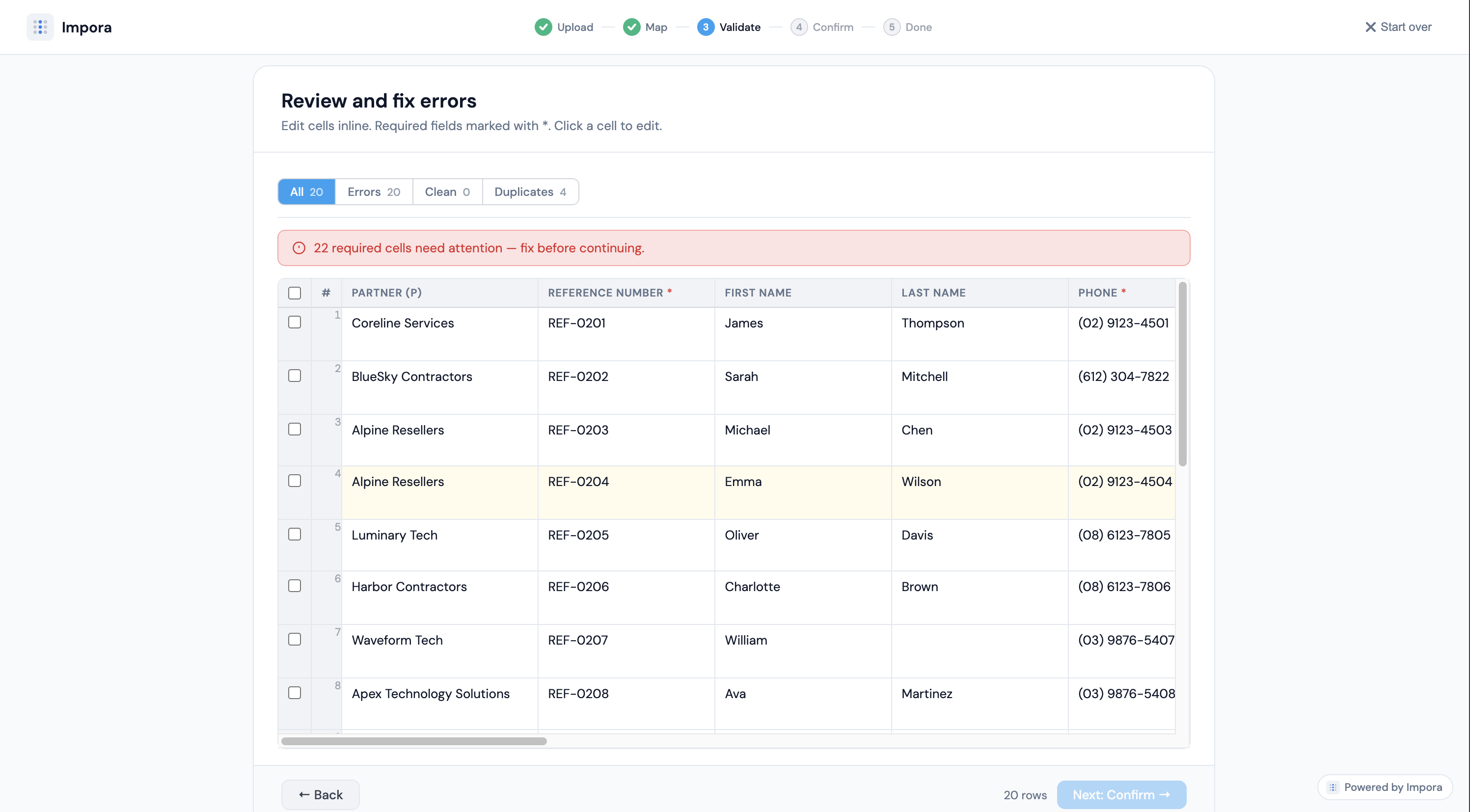
Review flagged rows before anything reaches Airtable
Connects to your existing stack
The problem
Airtable data breaks when movement is unmanaged.
Airtable is powerful because the base has structure. The risk starts when messy files, manual imports, scripts, and inbox handoffs bypass that structure.
Without a control layer, the first real validation often happens after the record already exists.
Files arrive from teams, suppliers, inboxes, folders, and exports with different structures
Columns, linked records, dates, and select values have to match the live Airtable schema
Native imports and scripts fail late, after operators already have cleanup work
Nobody has a single place to see what moved, what failed, and how to recover
Why Impora
Imports break when validation happens too late.
Impora moves the review step upstream. Catch issues when you import CSV into Airtable — mapping mismatches, invalid values, and linked records import in Airtable — before issues become cleanup work.
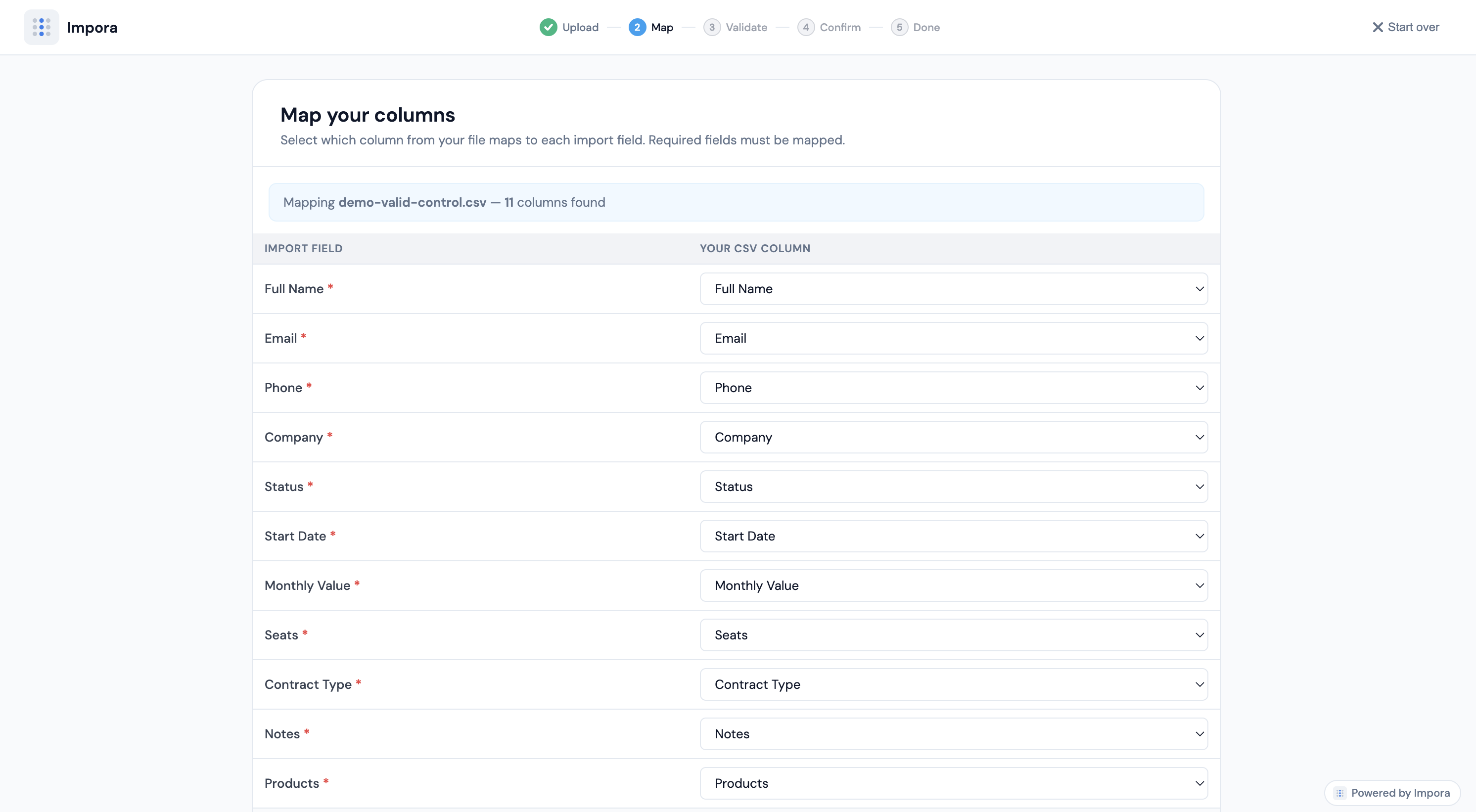
Column mapping
Map every column to the right Airtable field
The mapping layer is explicit before import, so teams review mismatches early instead of correcting records later in Airtable.
Columns auto-match to your live schema. Fix mismatches before import.
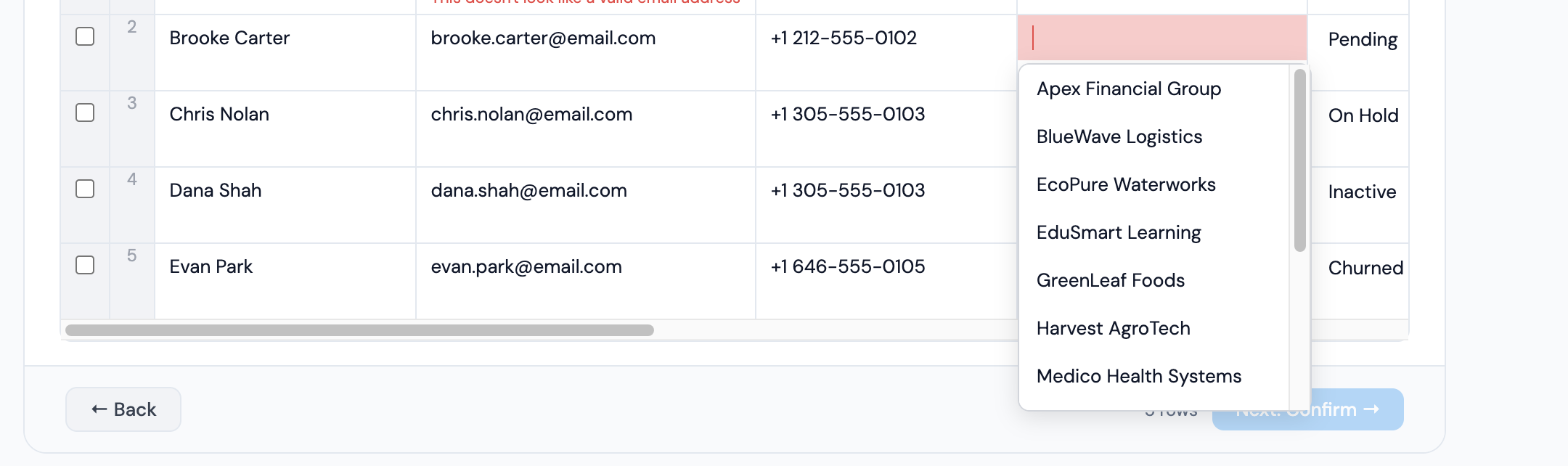
Linked records
Handle linked records and constrained fields
Dropdown constraints, relationships, and required values are validated against your real schema. No guesswork.
Linked records resolve automatically against your base
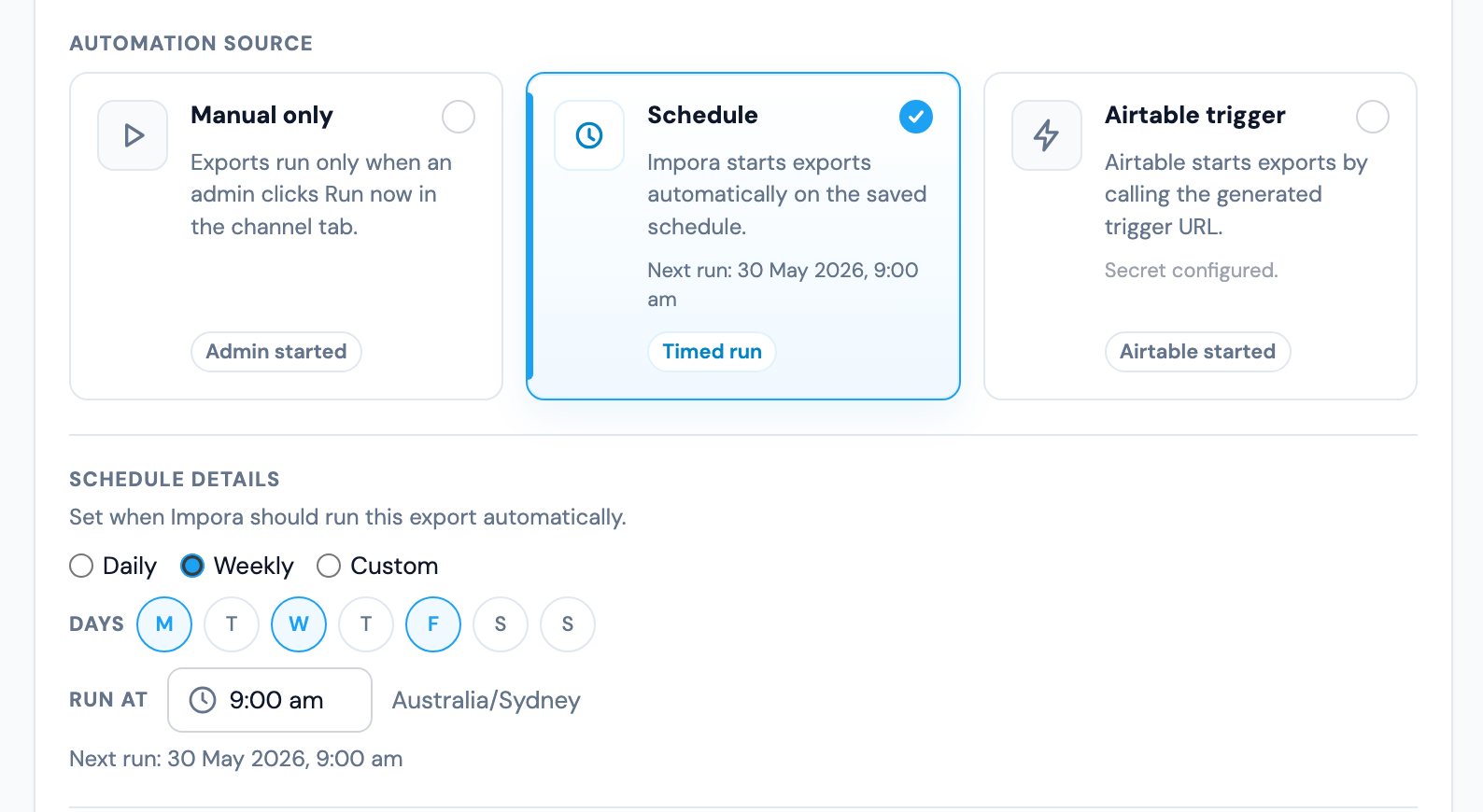
Automation rules
Automate repeatable runs from saved rules
Use the same validation setup for scheduled exports, Airtable-triggered runs, and recurring connector workflows without rebuilding the process each time.
Saved rules carry into scheduled runs, trigger-based exports, and repeatable connector workflows.
Core platform
One control layer for every Airtable data movement pattern.
The same template rules govern one-off uploads, folder automation, email handoffs, Airtable exports, and recovery workflows.
Import files
Upload CSV or Excel files directly, or let external contributors use a guided intake flow.
Receive by email
Give each template an inbox address with subject tokens and sender controls.
Automate folders
Watch Drive, SharePoint, and OneDrive folders with the same validation rules.
Export Airtable
Send Airtable snapshots to folders or email recipients on schedule, webhook, or manual run.
Recover cleanly
Track run history, processed files, error reports, and retries without manual base cleanup.
Connectors
Move files by folder or email. Keep Airtable clean.
Connect Drive, SharePoint, OneDrive, or an Impora inbox. Import, export, or roundtrip files through the same saved Airtable rules.

Auto-import
Drop a file, it imports automatically
Scheduled export
Airtable data exported on a schedule
Webhook export
Trigger exports from Airtable scripts
Roundtrip
Import and export with separate lanes
Email handoff
Receive and send CSVs by email
Failed rows generate an error report CSV or visible run history. Fix upstream, re-drop, or resend.
Available on Pro and Business
Compare
What changes when validation happens before import?
See the difference between Airtable's built-in CSV import and Impora's structured pipeline.
Airtable's built-in CSV import
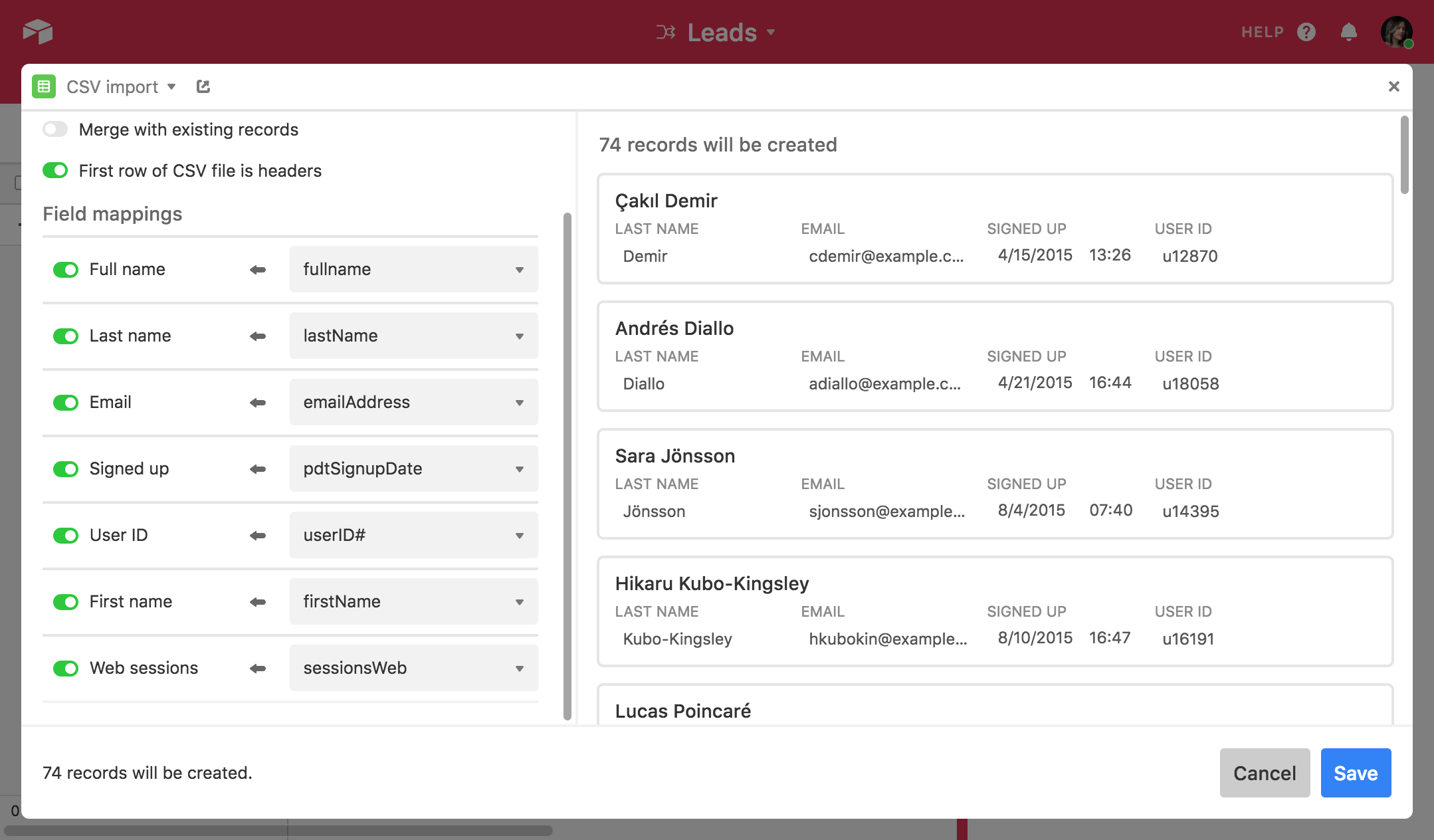
- ✕Map every field manually and type each destination name yourself
- ✕No validation layer, so records are created immediately on save
- ✕No linked record resolution or dropdown constraint checking
- ✕No review or approval step before data lands in your base
Impora
- ✓Fields populate automatically from your live Airtable schema
- ✓Full validation before a single record reaches Airtable
- ✓Linked records and constrained dropdowns handled natively
- ✓Review and approve the import before it runs
Use cases
Every source gets the same operating model.
Whether data comes from your team, a supplier, a scanner, a shared folder, or an export schedule, Impora keeps the movement governed.
For your team
Save the rules once. Reuse them everywhere.
Your team can upload files, automate folder imports, send exports, and review runs without rebuilding the workflow each time.
- ✓Templates persist, no rebuilding for repeat imports
- ✓Field rules and validation carry across uploads, folders, and exports
- ✓Run history makes imports, exports, and retries visible
For external contributors
Let partners send files without touching Airtable.
Partners can use a guided upload flow, a shared folder, or email handoff while Impora keeps validation and recovery under your control.
- ✓Anyone with the link or inbox address can submit, no Airtable account required
- ✓Data arrives validated and mapped before it touches your base
- ✓Email allowlists, subject tokens, and error reports keep handoffs governed
Airtable workflows
Import, export, email, folders, and recovery in one operating layer.
The details matter when a workflow becomes recurring. Impora keeps those handoffs visible before they become Airtable cleanup.
What does Impora do for Airtable?+
Impora controls data movement into and out of Airtable: direct uploads, folder connectors, email handoff, export automation, validation, and recovery.
Can Impora import CSV and Excel files into Airtable?+
Yes. Impora supports CSV and Excel uploads with mapping and validation before rows are written to Airtable.
Can suppliers or systems send files to Airtable by email?+
Yes. Email handoff gives each configured template an inbox path with sender controls and validation before import.
Can Impora export Airtable data?+
Yes. Export workflows can send Airtable snapshots to connected folders or email recipients where configured.
What happens when imported rows fail validation?+
Failed rows are held for review and recovery so teams can fix issues before bad data lands in Airtable.
Does Impora support linked records?+
Yes. Impora can validate and resolve linked record values against existing Airtable records before import.
What makes Impora's HubSpot Sync different?+
Impora is being built around association-aware sync: Airtable linked records, HubSpot associations, identity matching, conflict review, and recovery across Contacts, Companies, and Deals.
Build an Airtable data workflow your team can trust.
Uploads, folder automation, email handoff, exports, and recovery in one governed layer.